
 jamesread
95dcbcbeed
Docs and Raise Issue link in footer as it is more helpful for users
jamesread
95dcbcbeed
Docs and Raise Issue link in footer as it is more helpful for users
|
преди 5 години | |
|---|---|---|
| .github | преди 5 години | |
| cmd | преди 5 години | |
| internal | преди 5 години | |
| media | преди 5 години | |
| proto | преди 5 години | |
| var | преди 5 години | |
| webui | преди 5 години | |
| .dockerignore | преди 5 години | |
| .gitignore | преди 5 години | |
| .goreleaser.yml | преди 5 години | |
| CODE_OF_CONDUCT.md | преди 5 години | |
| CONTRIBUTING.adoc | преди 5 години | |
| Dockerfile | преди 5 години | |
| LICENSE | преди 5 години | |
| Makefile | преди 5 години | |
| OliveTin.proto | преди 5 години | |
| OliveTin.service | преди 5 години | |
| README.md | преди 5 години | |
| SECURITY.md | преди 5 години | |
| go.mod | преди 5 години | |
| tools.go | преди 5 години |
README.md
OliveTin

OliveTin is a web interface for running Linux shell commands.

Some example use cases;
- Give controlled access to run shell commands to less technical folks who cannot be trusted with SSH. I use this so my family can
podman restart plexwithout asking me, and without giving them shell access! - Great for home automation tablets stuck on walls around your house - I use this to turn Hue lights on and off for example.
- Sometimes SSH access isn't possible to a server, or you are feeling too lazy to type a long command you run regularly! I use this to send Wake on Lan commands to servers around my house.
Join the community on Discord.
YouTube video demo (6 mins)
Features
- Responsive, touch-friendly UI - great for tablets and mobile
- Super simple config in YAML - because if it's not YAML now-a-days, it's not "cloud native" :-)
- Dark mode - for those of you that roll that way.
- Accessible - passes all the accessibility checks in Firefox, and issues with accessibility are taken seriously.
- Container - available for quickly testing and getting it up and running, great for the selfhosted community.
- Integrate with anything - OliveTin just runs Linux shell commands, so theoretially you could integrate with a bunch of stuff just by using curl, ping, etc. However, writing your own shell scripts is a great way to extend OliveTin.
- Lightweight on resources - uses only a few MB of RAM and barely any CPU. Written in Go, with a web interface written as a modern, responsive, Single Page App that uses the REST/gRPC API.
- Good amount of unit tests and style checks - helps potential contributors be consistent, and helps with maintainability.
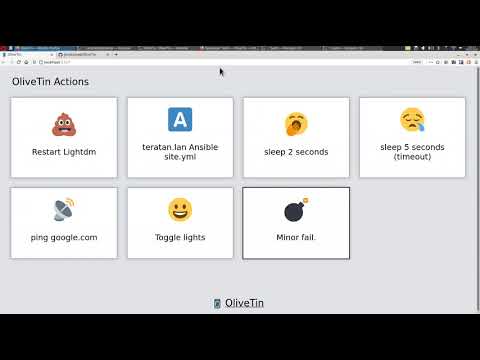
Screenshots
Desktop web browser;

Desktop web browser (dark mode);

Mobile screen size (responsive layout);

Documentation
All documentation can be found at http://olivetin.app . This includes installation and usage guide, etc.
Example config.yaml
Put this config.yaml in /etc/OliveTin/ if you're running a standard service, or mount it at /config if running in a container.
listenAddressWebUI: 0.0.0.0:1337 # Listen on all addresses available, port 1337
logLevel: "INFO"
actions:
- title: Restart Plex
  icon: smile
  shell: docker restart plex

  # This will send 1 ping
- title: Ping Google.com
  shell: ping google.com -c 1

  # Restart lightdm on host "overseer"
- title: restart lightdm
  icon: poop
  shell: ssh root@overseer 'service lightdm restart'
A full example config can be found at in this repository - config.yaml.